End-of-Year Sale: Subscribe by December 31 to Get 3 Months Free!
Learn More

Table of Contents

Experience Better Practice Management Today!
Starting at $28.05/month
No Credit Card Required
Experience Better Practice Management Today!
Starting at $30/month
No Credit Card Required
Running a small clinic means juggling patient care with admin tasks like scheduling, billing, and record-keeping, which can take up valuable time.
Patient management software simplifies these tasks by combining scheduling, documentation, billing, and communication in one system.
In this blog, we’ll compare the top patient management software for small clinics and highlight features, pricing, and best use cases to help you choose the right solution.
Key Takeaways & Recommendations
Here’s a scannable summary for you first:
| Tools | Best For | Capterra Rating | Pricing |
|---|---|---|---|
| Noterro | Solo practitioners & small clinics needing an affordable, all-in-one management solution | 4.8/5 | Starts from $28.05/month (Free 14-day trial available) |
| Practice Better | Wellness and coaching professionals, nutritionists, and small clinics looking for a simple, cost-effective platform to manage scheduling, billing, and telehealth | 4.8/5 | Starts from $25/month |
| Jane App | Allied health and wellness clinics—physios, chiros, massage therapists—looking for flexible, intuitive software managing scheduling, billing, and documentation | 4.8/5 | Starts from $54/month |
| ChiroTouch | Chiropractic clinics seeking an all-in-one EHR, scheduling, and billing system tailored to their specialty | 4/5 | Starts at $159/month |
| DrChrono | Multi-provider and expanding clinics wanting customizable, mobile-friendly EHR with integrated billing and telehealth | 4/5 | Custom pricing |
| Ensora Health | Mental health professionals, therapy clinics, and small healthcare practices looking for an all-in-one solution for patient management, billing, and telehealth | 4.4/5 | Custom pricing |
| Cliniko | Small health and wellness clinics seeking a straightforward, reliable practice management solution for scheduling, billing, and documentation | 4.7/5 | Tiered pricing (~$45/mo+) |
| SimplePractice | Solo practitioners and small healthcare clinics seeking a user-friendly platform to manage scheduling, billing, and telehealth from one place | 4.6/5 | Starts from $24/month |
| Tebra | Practices with complex insurance billing needs looking for a scalable, user-friendly practice management solution | 3.9/5 | Custom pricing |
| Practice Fusion | Solo practitioners and small ambulatory clinics seeking a user-friendly EHR with core practice management features | 3.7/5 | Starts from $149/month per provider |
Every clinic operates differently, but the right patient management software can simplify your day-to-day work, from scheduling and charting to billing and patient communication.
Below are ten of the best options for small clinics in 2025, each offering unique features to help you save time, stay organized, and deliver better patient care.
Noterro is designed for independent practitioners and small clinics that need an all-in-one solution to streamline patient management by putting all scheduling, billing, and patient records management on a single, easy-to-use platform.
With features in the software such as customizable SOAP notes and a patient portal for secure communication and payment, Noterro removes administrative headaches while improving efficiency in the clinic.
Features:
Pros
Cons
Capterra Rating: 4.8/5
Pricing: Starts from $28.05/month. Free 14-day trial available.
Best For: Solo practitioners & small clinics needing an affordable, all-in-one management solution.
Related read: Stress-Free Billing for Solo & Mobile Clinics: Guide to Tips & Tools

Practice Better pulls together client management for wellness practitioners, nutritionists, coaches, and tiny health clinics. Scheduling, billing, telehealth, client communication—everything lives in one straightforward hub.
Perfect fit for solopreneurs and small crews who manage client relationships across virtual and face-to-face sessions without blowing their budget.
Features:
Pros
Cons
Capterra Rating: 4.8/5
Pricing: Starts from $25/month
Best For: Wellness and coaching professionals, nutritionists, and small clinics looking for a simple, cost-effective platform to manage scheduling, billing, and telehealth.
Also read: 10 Best Medical Appointment Scheduling Software 2026
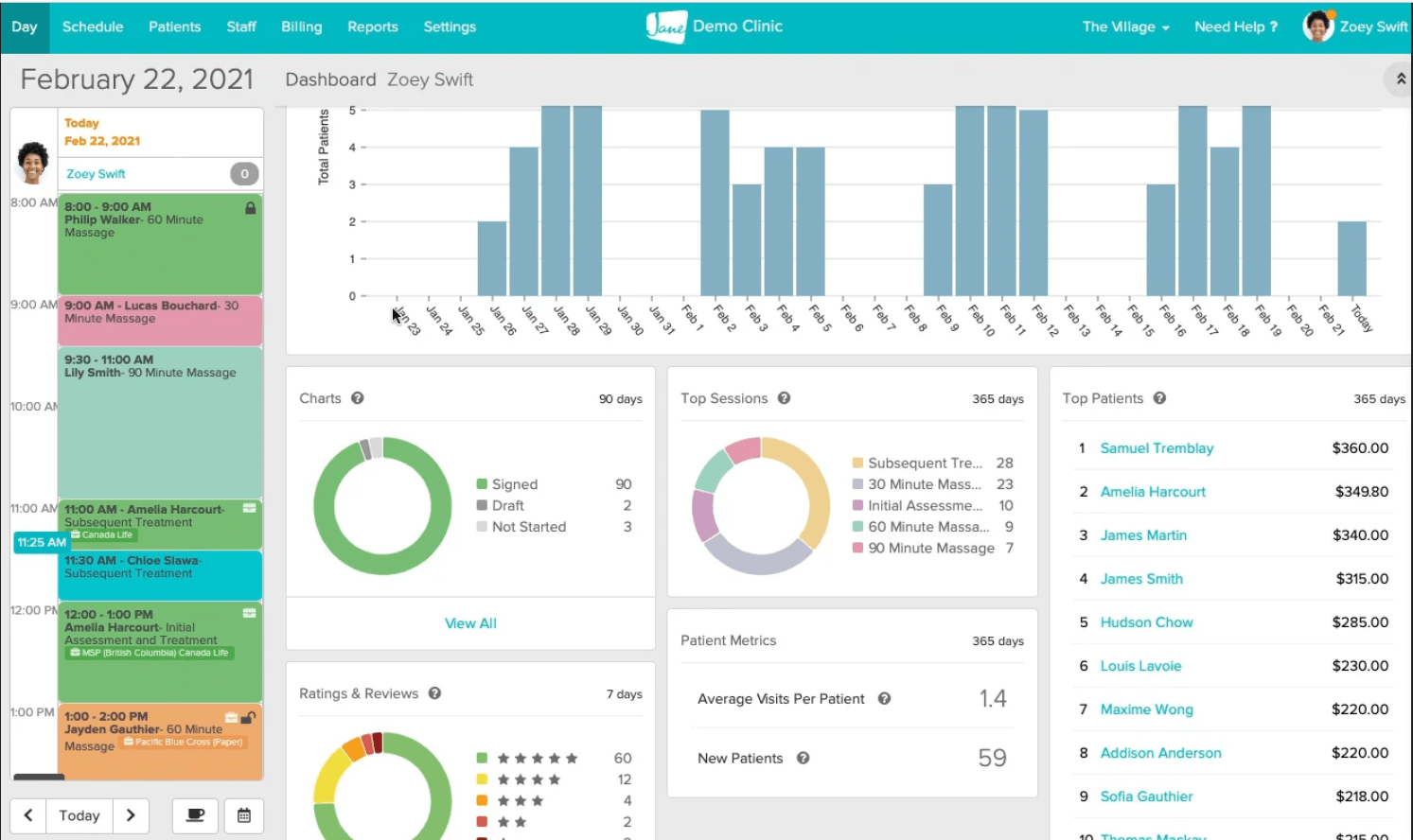
Jane App serves allied health pros—physios, chiros, massage therapists, acupuncturists. It packs scheduling, charting, billing, and telehealth into one platform that people actually enjoy using. The interface works, forms bend to your needs, and patients find it simple.
Features:
Pros
Cons
Capterra Rating: 4.8/5
Pricing: Starts from $54/month
Best For: Allied health and wellness clinics—physios, chiros, massage therapists—hunting for flexible, intuitive software managing scheduling, billing, and documentation without the hassle.
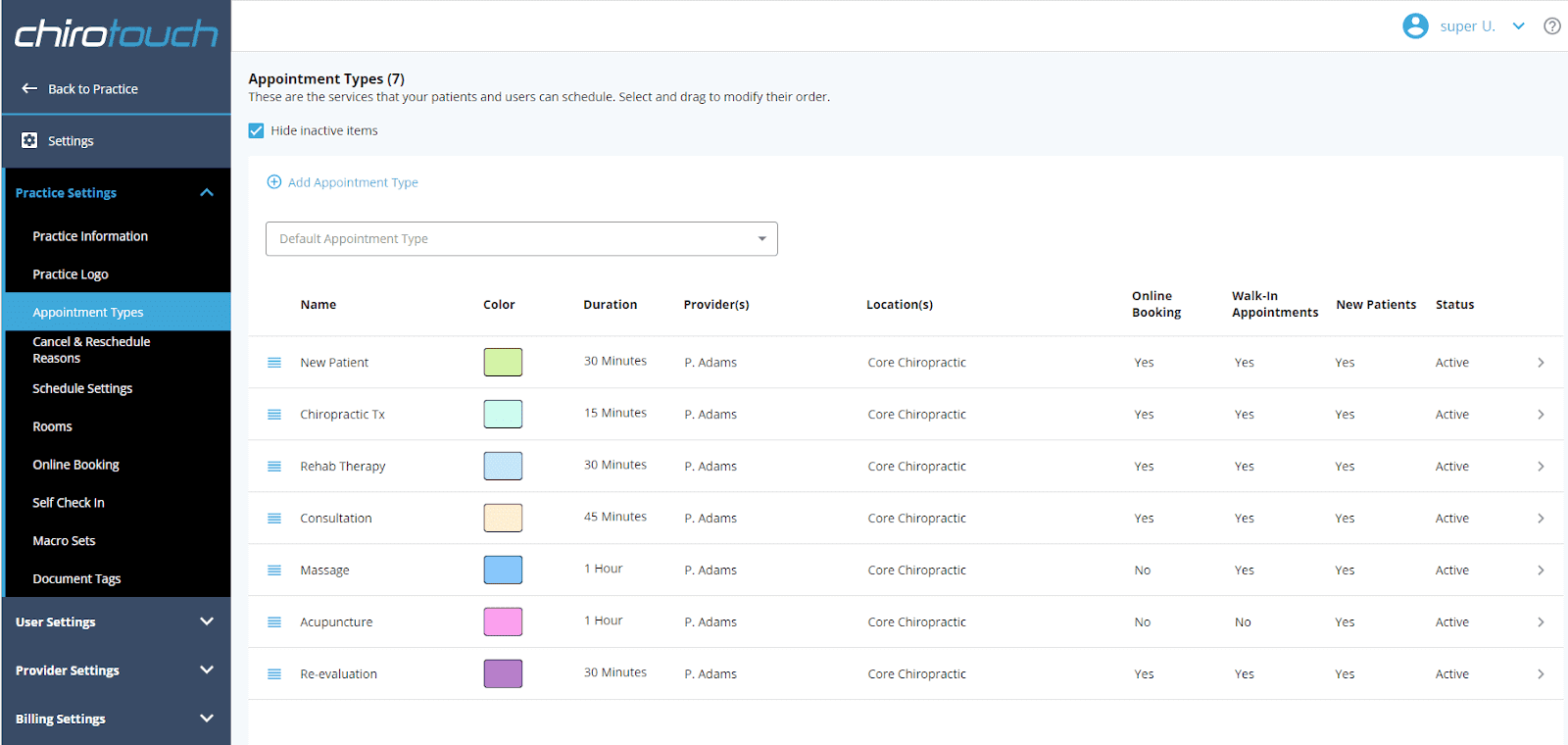
ChiroTouch targets chiropractic clinics exclusively. This specialised platform bundles EHR, scheduling, billing, and patient communication for chiros who need tools matching their specific workflow. Daily operations get simpler while compliance stays tight and patients stay happy.
Features:
Pros
Cons
Capterra Rating: 4/5
Pricing: Starts at $159/month
Best For: Chiropractic clinics seeking an all-in-one EHR, scheduling, and billing system tailored to their speciality.

DrChrono delivers all-in-one EHR and practice management for small to mid-sized healthcare clinics. This cloud platform bundles scheduling, billing, telehealth, and clinical documentation together. Mobile-friendly design plus speciality customisation lets practitioners manage patients from anywhere.
Features:
Pros
Cons
Capterra Rating: 4/5
Pricing: Custom pricing
Best For: Multi-provider and expanding clinics wanting a customizable, mobile-friendly EHR with integrated billing and telehealth.
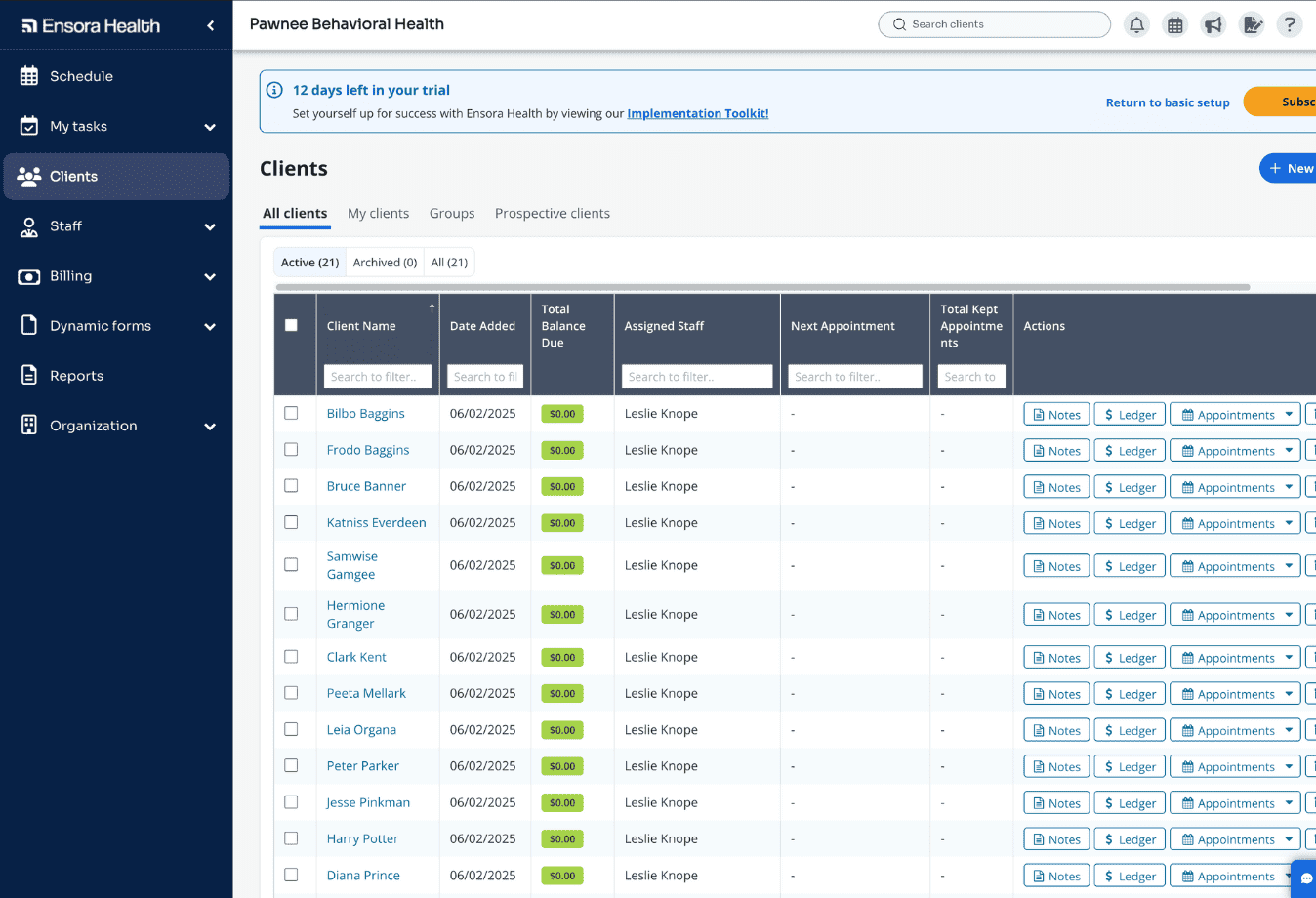
Ensora Health is an all-in-one practice management software solution designed for mental health professionals, therapy clinics, and small healthcare practices. This solution will make all the most important tasks-such as scheduling, billing, and providing patient care-much easier to handle by offering one interface through which you can manage your in-person and virtual sessions.
Ensora Health provides customizable features, including progress notes, along with telehealth integration to facilitate better operations of the clinic and enhance patient care.
Features:
Pros
Cons
Capterra Rating: 4.7/5
Pricing: Custom pricing.
Best For: Mental health professionals, therapy clinics, and small healthcare practices looking for an all-in-one solution for patient management, billing, and telehealth.

Cliniko is a simple yet powerful practice management software designed for small health and wellness clinics. It offers all the essential tools—scheduling, billing, charting, and reporting—in one user-friendly platform. Cliniko’s focus on simplicity and reliability makes it an excellent choice for clinics that want to streamline operations without unnecessary complexity.
Features:
Pros
Cons
Capterra Rating: 4.7/5
Pricing: Custom pricing
Best For: Small health and wellness clinics seeking a straightforward, reliable practice management solution for scheduling, billing, and documentation.
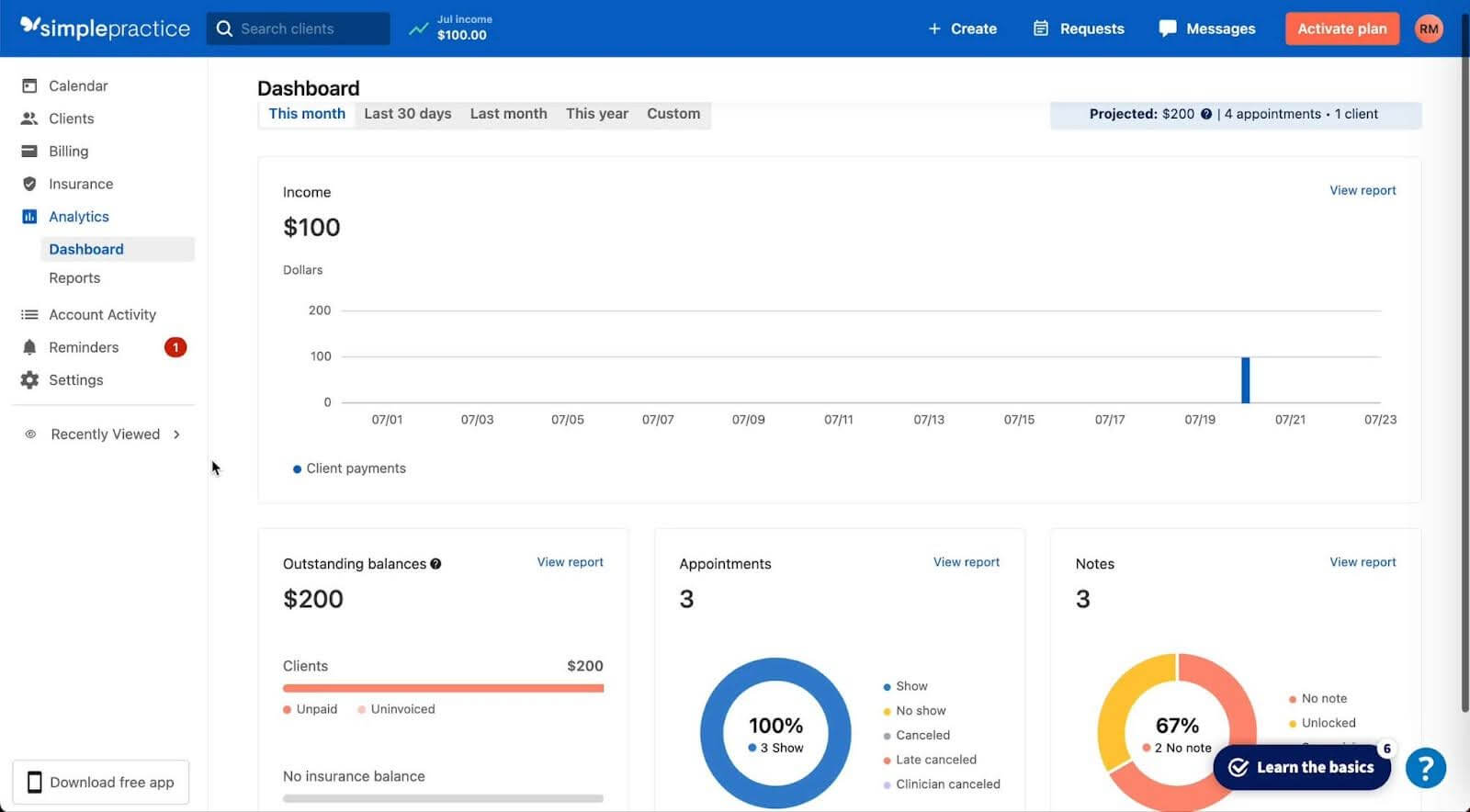
SimplePractice is one of the most widely used practice management platforms among solo and small healthcare providers. It combines scheduling, billing, documentation, and telehealth into one clean, intuitive interface. Known for its ease of use and strong automation features, SimplePractice helps practitioners reduce admin time while improving client communication and record accuracy.
Features:
Pros
Cons
Capterra Rating: 4.6/5
Pricing: Starts from $24/month
Best For: Solo practitioners and small healthcare clinics seeking a user-friendly platform to manage scheduling, billing, and telehealth from one place.

Tebra is cloud-based practice management software for small to medium healthcare practices, bundling scheduling, billing, and patient management together. It excels at complex insurance billing—streamlining everything from patient intake through claims submission. User-friendly and scalable, Kareo fits growing practices needing a solid administrative backbone.
Features:
Pros
Cons
Capterra Rating: 3.9
Pricing: Custom pricing
Best For: Practices with complex insurance billing needs, looking for a scalable, user-friendly practice management solution.
You might also like: Top 8 Payment Processing Tools for Healthcare Clinics [2026]
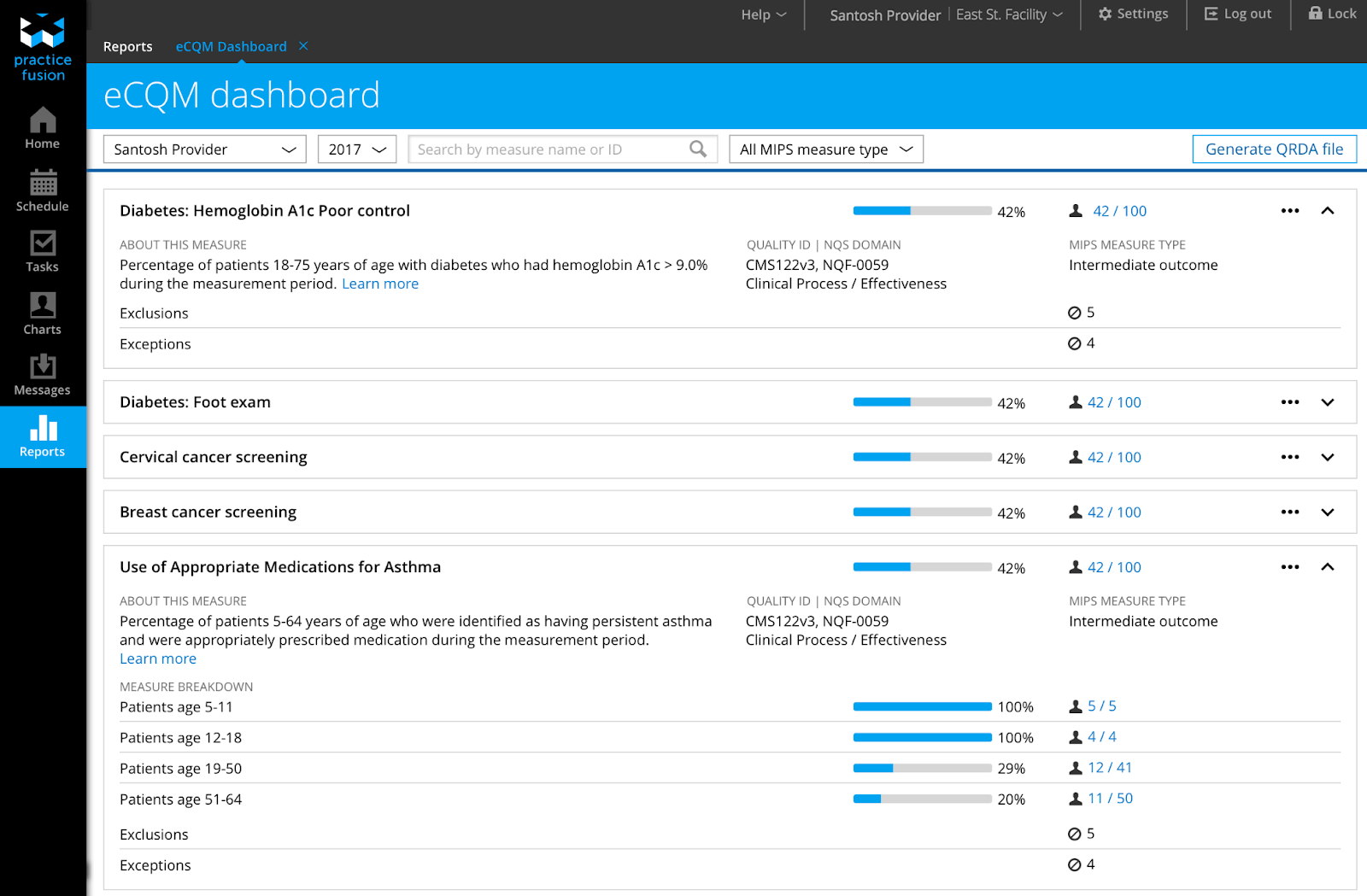
Practice Fusion is a widely used cloud‑based EHR and clinic management platform designed for small and independent practices. It offers core clinical and administrative tools in a streamlined, easy‑to‑navigate interface, making it a solid choice for providers who want an affordable yet functional solution.
Features:
Pros
Cons
Capterra Rating: 3.7/5
Pricing: Around $149 per provider per month (flat rate).
Best For: Solo practitioners and small ambulatory clinics seeking a user‑friendly EHR with core practice management features.
wants to go next. This decision should not come down to a feature list alone. It should come down to how well the system fits the clinic’s size, workflow, staff structure, and daily admin load.
Here are the main areas to evaluate.
A solo practice will not need the same setup as a small clinic with several practitioners and front desk support. Some platforms feel manageable at first, then start creating friction once the schedule gets busier or the team grows.
The better choice will support your current workflow without feeling too basic or too complicated.
Clinical documentation should feel familiar, efficient, and easy to complete between patient appointments. A chiropractor, massage therapist, and physiotherapist will not all need the same charting flow or note structure.
If the charting feels rigid, repetitive, or slow, that issue will keep showing up throughout the day.
Scheduling should do more than place appointments on a calendar and leave the rest to staff. Online booking, rescheduling, reminders, cancellations, and waitlists should all work together without creating extra cleanup. When scheduling works properly, the clinic runs with fewer avoidable gaps, missed visits, and double-handling.
Billing should feel like part of the workflow, not like a separate admin task after care is done. When invoices, payments, insurance details, and appointments sit in different places, staff end up repeating work and correcting small mistakes. A connected setup usually saves more time than a platform with a longer billing feature list.
Good software should reduce repetitive admin instead of giving staff one more place to manage. Patients should be able to complete forms, review booking details, and handle routine actions without calling the clinic every time.
That usually improves both staff efficiency and the overall patient experience from the first interaction.
Even small clinics usually have different roles, and those roles do not need the same level of visibility. Practitioners, assistants, and front desk staff should each have access that matches what they actually need to do.
Noterro includes staff management, assistant accounts, and permission controls designed for clinic teams.
A platform can look strong on paper and still create problems once the team starts using it daily. If scheduling, charting, billing, and communication keep pulling staff into separate systems, the workflow becomes slower and harder to manage.
The best software reduces switching, duplicate work, and unnecessary handoffs across the day.
Lower pricing does not always mean better value once the clinic starts using the software daily. If staff still spend hours fixing bookings, following up on payments, or repeating manual tasks, the lower fee stops looking like a real advantage. The better option is the one that reduces friction and gives time back every week.
Even simple software can feel frustrating when setup is unclear, and support is hard to reach. Small clinics usually do not have extra time to troubleshoot everything alone while still running a full schedule.
Noterro highlights guided onboarding and 1-on-1 support as part of helping clinics get started faster.
The right patient management software should make the clinic easier to run, not harder. Scheduling, billing, charting, and patient management should all work smoothly together, without creating extra steps for your team.
The best choice will depend on how your clinic operates today and what it may need next. A solo practitioner may care more about ease of use and affordability, while a growing clinic may need stronger workflow control, staff access settings, and more flexibility across the team.
When the software fits the size of your clinic and the way your staff actually work, daily tasks feel more manageable. That gives your team more time to focus on patient care and helps the practice grow with less operational strain.

Tags
Ryan Barichello, Co-Founder of Noterro, is a dynamic leader with a vision for innovation and excellence in the tech industry. With both a Business and Computer Science diploma from Mohawk College, Ryan has honed his business and software development expertise.
His leadership and dedication have garnered him several prestigious awards, including the 2018 Fast 40 Hamilton issued by Hamilton Economic Development. He also received the 2015 Outstanding Small Business of the Year from the Stoney Creek Chamber of Commerce and the 2013 Hamilton Top 40 Under 40 from Business Link Media.
Beyond his professional achievements, Ryan is deeply involved in community initiatives. As a board member of Festitalia for 9 years, he actively promoted Italian culture and heritage in the community. He also has spent time volunteering as a mentor in Greater Hamilton Teaching Youth Entrepreneur Program (M.I.G.H.T.Y), nurturing the next generation of leaders.
With a keen eye for detail and a disciplined approach, Ryan tackles challenges with precision, ensuring that every project he undertakes is a resounding success. Ryan's strategic mindset and passion for entrepreneurship have been instrumental in propelling Noterro to the forefront of the industry.
Driven by a relentless pursuit of excellence, Ryan is passionate about technological innovation. His expertise in addressing complex challenges with precision, alongside his dedication to innovation, sets him apart as a leader in the technology field.


.webp)
No credit card required. Available 1-on-1 support.
.webp)
No credit card required. Available 1-on-1 support.
.webp)
.webp)




.webp)